THE BUYING DESK / PUBLIC-SOURCE SHORTLIST

4 USB-C SD Card Readers: Match the Import Task

Choose a USB-C SD card reader by the cards you own and the import job you repeat. One SD slot, separate SD and microSD slots, and two full-size SD slots are different arrangements. These four documented readers illustrate those choices; none is a measured transfer-speed winner.

By Top10Taobao Editorial · Sources checked November 5, 2026 · US edition

01 / CHECK THE COMPLETE SETUP

Start with the requirement.

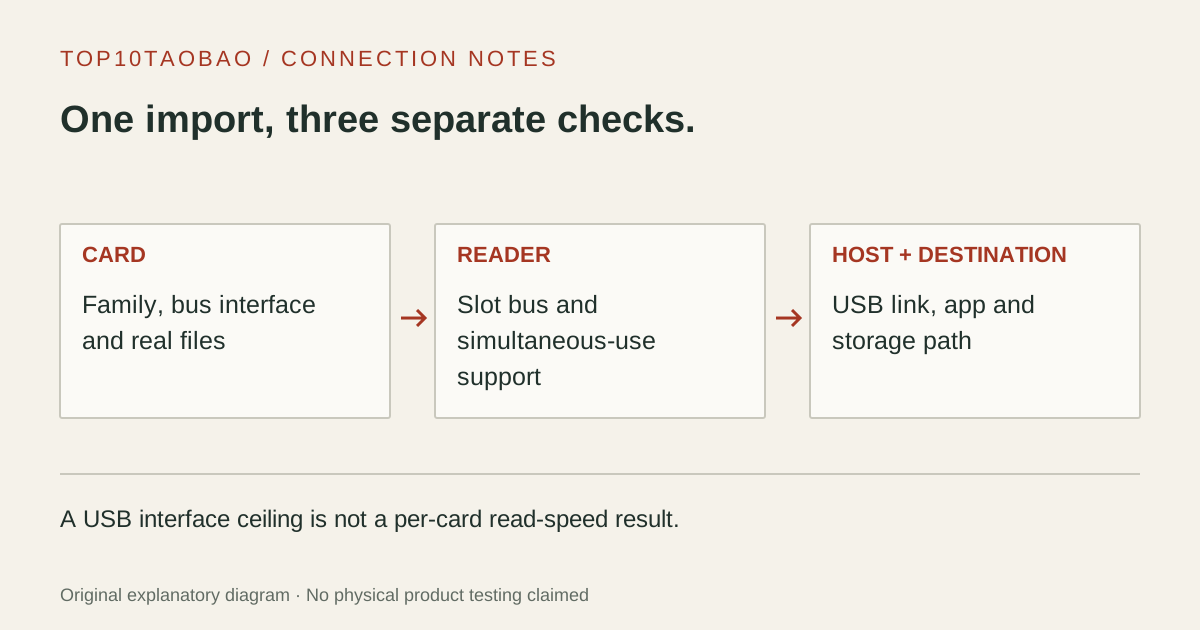
Identify each card’s exact family and bus interface, then list how many cards you need to read together. Check the reader’s host connection and the destination drive, not just its plug. For an iPad or phone, verify the supported import app, device model, OS and power arrangement as separate conditions. Keep the original card contents until the imported files and your backup have been checked.

Do not substitute a similar product name or a different regional package. The sources linked under each entry support the named model and its stated conditions.

A card-import checklist follows the card bus through the reader slot to the host connection and destination, keeping USB rate separate from card rate.
Original explanatory diagram; not a product photograph or tested wiring configuration.

02 / THE COMPARISON

Read the limit beside the headline.

Scroll the table horizontally on a small screen. Limits are manufacturer claims, not measurements. Ask the maker about a condition that is decisive and still unknown.

Exact models and documented restrictions; prices and live stock omitted
ModelSlots and documented card busHost connectionSimultaneous-card evidenceDecisive limitation
01Apple USB-C to SD Card ReaderMW653AM/A, reviewed US partOne SD slot; UHS-II and backward-compatible SD cardsUSB-C; a numerical USB link rate is not stated on the reviewed pageOne physical SD slotCheck the exact Mac, iPad or iPhone in Apple’s compatibility list
02SanDisk Extreme PRO SD UHS-II ReaderSDDR-409-C46 on the reviewed product pageOne SD slot; UHS-II, UHS-I and non-UHS SD; microSD via adapterUSB-C; USB 3.0 in maker specificationsOne physical SD slotMac/PC USB-C scope; match the region and part suffix
03Lexar Professional USB-C Dual-Slot ReaderRW470; LRW470U-RNHNU in the North America listingSeparate SD and microSD slots; UHS-II with UHS-I backward compatibilityBuilt-in USB-C lead; USB 3.2 Gen 1Two slots listed; simultaneous use not confirmed in the reviewed pageDo not infer dual-card transfer capability from “Dual-Slot” alone
04ProGrade Digital Dual-Slot SD ReaderPG08 / PG-08Two full-size SD slots; SDHC/SDXC and UHS-I/II listedUSB 3.2 Gen 2, 10Gbps; USB-C and USB-A cables listedMaker explicitly documents simultaneous transfers from both SD slotsThe 10Gbps USB label is not a per-card SD read rate

03 / THE EXACT MODELS

Choose the fit.
Keep the restriction in view.

01

Apple USB-C to SD Card Reader

Exact model: MW653AM/A, reviewed US part

Consider it for

A single-SD-card workflow on a device covered by Apple’s compatibility list. The product record explicitly covers USB-C Mac, iPad and iPhone use and UHS-II SD cards. That documented device relationship is the reason to consider it; it is not evidence that Apple’s reader transfers a particular card faster than the other entries.

Skip it when

Choose a different slot arrangement for two full-size SD cards or a dedicated microSD socket. Do not fill in a 5Gbps or 10Gbps USB figure from its connector: the reviewed technical section does not state one. A supported reader also does not guarantee that every camera file will appear in every import application.

Also compare: RW470 supplies separate SD and microSD slots when that is the required arrangement.

Apple MW653AM/A: USB-C to SD Card Reader ↗Manufacturer specification · checked Nov 5, 2026
02

SanDisk Extreme PRO SD UHS-II Reader

Exact model: SDDR-409-C46 on the reviewed product page

Consider it for

A one-card computer import where a full-size SD socket is sufficient. SanDisk separately lists backward-compatible SD card types and microSD through an adapter. Count that adapter in the workflow rather than treating the product as a two-slot SD/microSD reader. The flexible connection is a layout fact, not our durability result.

Skip it when

It does not provide two independent card positions. Do not substitute a retailer’s similar part suffix without checking which version is supplied, or assume support for a phone merely because it has USB-C. Published UHS-II support is not a measured read rate for your card, cable path or file set.

Also compare: PG08 is the different arrangement for two full-size SD cards with documented simultaneous transfers.

03

Lexar Professional USB-C Dual-Slot Reader

Exact model: RW470; LRW470U-RNHNU in the North America listing

Consider it for

A computer workflow that alternates between full-size SD and microSD media. Separate slots can remove the need to keep a loose microSD-to-SD adapter with the reader. The regional part number and interface are published in the maker’s record, which is more useful for identifying the unit than a generic “Lexar USB-C” title.

Skip it when

Ask Lexar before buying specifically to transfer from both slots at once: the reviewed product text does not establish that condition. Its advertised card-speed figures remain vendor ceilings under stated system/card conditions. They do not establish a proprietary faster UHS-I mode for every card or validate your current tablet and import app.

Also compare: PG08 explicitly documents simultaneous use, but its two slots are both full-size SD.

Lexar RW470: Professional USB-C Dual-Slot Reader, North America part ↗Manufacturer specification · checked Nov 5, 2026
04

ProGrade Digital Dual-Slot SD Reader

Exact model: PG08 / PG-08

Consider it for

A two-camera or two-card desk workflow where both media are full-size SD and simultaneous transfers are a stated requirement. ProGrade documents concurrent use and lists both host cable types. Those are concrete reasons to compare this arrangement with a reader that provides only one SD slot.

Skip it when

It does not add a dedicated microSD socket or establish SD Express mode. The maker’s USB-bus headline must not be read as a 1.25GB/s result from one UHS-II card. Check the current regional package and your host connection, then preserve the card originals until each imported set has been verified.

Also compare: Apple’s single-slot arrangement may meet a simpler one-SD-card Apple-device workflow.
04 / PUT IT TO WORK

Different tasks change the shortlist.

One camera card and a USB-C Mac or iPad

Check the exact Apple device and app path first. Apple’s reader provides one SD slot with an explicit device compatibility list. If the same card is imported on a PC, compare the computer scope of the SanDisk reader as well.

A camera SD card and a drone microSD card

Lexar RW470 has separate physical slots. That can simplify handling two card sizes, but simultaneous copying remains a condition to confirm rather than a promise inferred from the word “dual.”

Two full-size SD cards after a shoot

PG08 explicitly documents concurrent card transfers. Count the destination drive and host link in the task, and keep the two imported sets identifiable. Concurrent support is not a measured time saving for a particular shoot.

05 / EVIDENCE & SCOPE

What the comparison establishes.

All capabilities are manufacturer specifications, not our throughput, endurance or data-integrity tests. Card and USB interface ceilings are not an import-time forecast. Slots, adapters, filesystem, file types, host and destination can change the workflow. Match the exact regional part, current support and package contents. No prices, live availability, affiliate tracking or copied product photos are included.

Each entry has an original fit explanation, an exclusion and an alternative. We selected the models for distinct documented arrangements rather than copying another publication's order. Unknown fields are not filled by estimates, and manufacturer marketing measurements are not relabeled as independent tests.

Read our editorial method and commercial disclosures. For the complete host path, see the buying guides and the USB-C hub comparison.

SCENARIO WORKSHEET

Keep the SD bus and USB interface in separate columns

A reader has at least two interfaces: the card-facing bus and the connection to the computer. The SD Association’s interface table gives UHS-I a standard ceiling of 104MB/s and UHS-II a half-duplex ceiling of 312MB/s. Those are bus capabilities, not the minimum speed of a card and not a measured import result.

PG08 illustrates why the distinction matters. Its published 10Gbps USB interface corresponds to a raw 1.25GB/s bit-to-byte conversion, but that arithmetic does not describe one UHS-II card. The card bus, card’s own behavior, concurrent workload and destination remain separate constraints. We do not relabel a USB headline as a per-slot benchmark.

Likewise, V30, V60 or V90 markings concern a recording speed class, not a guarantee that a computer will import at that number or at the reader’s largest advertised rate. Use the UHS interface and speed-class guide to read the symbols before replacing a working reader. USB-C itself identifies the connector, not UHS-II or SD Express support.

None of these four reviewed product records establishes an SD Express mode. If that is the task, verify the card and reader’s explicit SD Express compatibility and fallback behavior rather than treating a familiar SD slot or USB-C plug as sufficient evidence.

Choose by the import workflow, then verify the files

Write down the import job before selecting slots
WorkflowCheck before purchaseDo not infer
One SD cardCard family, UHS support, exact device and import appA reader’s maximum label is the card’s actual read speed
SD plus microSDSeparate slots or a suitable adapter; required simultaneous useTwo slot openings prove concurrent transfers
Two SD cardsTwo full-size slots and an explicit concurrent-use statementA dual-slot SD/microSD reader accepts two full-size cards
An iPad importModel, iPadOS, Files/Photos behavior and external powerComputer compatibility automatically covers every tablet

Keep the destination folders separate when importing more than one card. Check that the expected files can be opened, preserve the originals and retain a second copy before reusing recording media. A card reader’s activity light is not a complete file-verification report. This page does not instruct you to format a card to make it appear.

For iPad, Apple documents the external-storage and filesystem requirements. A reader appearing in Files and a camera file being importable in Photos are different checks. Start with the iPad connection worksheet if power, display and storage must share the tablet’s port.

If a reader is connected through a hub, include that hub’s upstream link and other active devices in the plan. A hub with a card slot may meet a combined port need; a dedicated reader may suit a different card or slot arrangement. The USB link-rate guide keeps the host-side limit separate from the card-facing bus.