THE BUYING DESK / PUBLIC-SOURCE SHORTLIST

6 USB-C Ethernet Adapters: Choose the Whole Link

A USB-C Ethernet adapter is useful when a wired network is the missing connection. Choose its host interface, network rate and operating-system support together. These six documented options cover a fixed Gigabit cable, USB-A/C flexibility, 2.5GbE and a 5GbE path; the largest number is not a universal upgrade.

By Top10Taobao Editorial · Sources checked November 5, 2026 · US edition

01 / CHECK THE COMPLETE SETUP

Start with the requirement.

Write down the computer model, exact USB port, OS version and architecture, switch/router port rate, cable run and destination. Decide whether you need an RJ45 socket or a complete cable ending in an RJ45 plug. Then decide whether the same USB-C port must charge the computer. None of these adapters replaces a router, creates internet service or turns a slow remote server into a faster one.

Do not substitute a similar product name or a different regional package. The sources linked under each entry support the named model and its stated conditions.

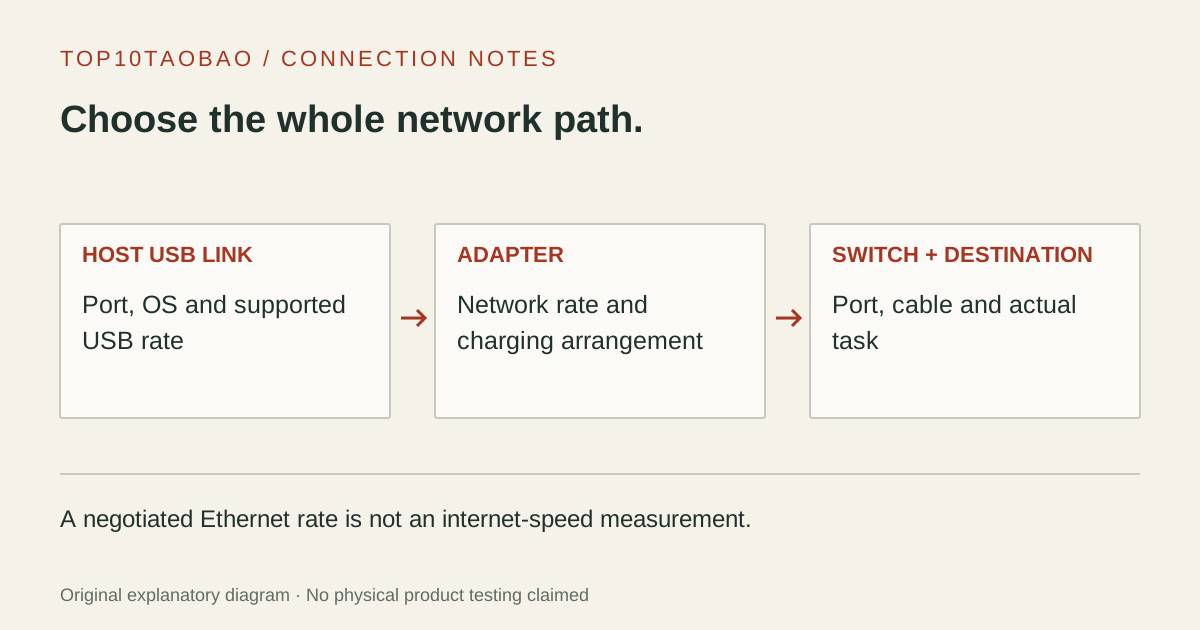
An Ethernet connection is checked as three independent parts: computer USB link, adapter and switch-to-destination network path.
Original explanatory diagram; not a product photograph or tested wiring configuration.

02 / THE COMPARISON

Read the limit beside the headline.

Scroll the table horizontally on a small screen. Limits are manufacturer claims, not measurements. Ask the maker about a condition that is decisive and still unknown.

Exact models and documented restrictions; prices and live stock omitted
ModelConnection to the hostDocumented network roleMaker’s system scopeCharging arrangement
01Plugable Gigabit Ethernet CableUSBC-E1000-2MUSB-C 5Gbps; integrated 2m cable1GbE; RJ45 plug connects directly to the network portWindows, macOS and Linux hosts listed; verify the exact deviceUSB-powered; no laptop-charging input
02Plugable 2.5G USB-A/C AdapterUSBC-E2500USB 5Gbps; USB-C and USB-A connection options2.5GbE ceiling; a matching network port is requiredWindows, macOS, ChromeOS; conditional Linux support in maker tableBus-powered; no PD charging input
03StarTech 2.5GbE USB-C AdapterUS2GC30USB-C; USB 3.2 Gen 1, 5Gbps2.5GbE / 1GbE / 100Mbps in the datasheetWindows and Linux listed; reviewed macOS list names 10.11–11USB-powered; no separate supply or PD input listed
04Belkin Connect 2.5Gb Ethernet AdapterINC012 family; match regional and color suffixUSB-C; fixed 90mm tether in maker support record10 / 100 / 1000 / 2500Mbps listedWindows 10/11, macOS 10.14+, ChromeOS 44+ in maker listNo laptop-charging input listed
05Plugable 2.5G Ethernet with PD InputUSBC-E2500PDUSB-C; USB 5Gbps network path2.5GbE ceilingWindows 10/11, macOS 11+, updated ChromeOS in maker tableSeparate charger required; up to 100W pass-through claim
06Plugable USB-C to 5GbE AdapterUSBC-E5000USB 3.2 Gen 2, 10Gbps; slower host links constrain it5GbE ceiling; verify the switch’s 2.5/5GbE modesWindows 10/11, Apple M-series Macs, suitable ChromeOS hosts listedBus-powered; no PD charging pass-through

03 / THE EXACT MODELS

Choose the fit.
Keep the restriction in view.

01

Plugable Gigabit Ethernet Cable

Exact model: USBC-E1000-2M

Consider it for

A desk or travel position with a Gigabit switch close enough for the integrated two-meter lead. The cable itself supplies the distance to the network socket, so the shopping list differs from a short dongle that also needs a separate Ethernet cable. Its useful distinction is that complete cable arrangement, not an assumed network-speed advantage.

Skip it when

Choose another arrangement if you need a replaceable network lead, a longer run, a 2.5GbE link or charging through the occupied USB-C port. Connecting it to a faster switch does not change its Gigabit ceiling. Plugable’s device list is narrower than every product with a USB-C socket; check mobile and console support separately.

Also compare: USBC-E2500 provides an RJ45 socket and a 2.5GbE option when those are the missing requirements.

Plugable USBC-E1000-2M: exact model, link and supported hosts ↗Manufacturer specification · checked Nov 5, 2026
02

Plugable 2.5G USB-A/C Adapter

Exact model: USBC-E2500

Consider it for

A mixed fleet of USB-A and USB-C computers where a separate Ethernet cable is already part of the setup. The maker documents both host connections and a Realtek RTL8156B controller. That combination is a practical reason to compare it with a fixed USB-C model before choosing the smallest dongle.

Skip it when

It does not solve charging through a single USB-C port. Do not infer support for a particular ARM system, Android device or console from a desktop OS name. Plugable’s Windows path can involve Windows Update, while its macOS and Linux notes differ. Check the actual platform table before buying a spare for several machines.

Also compare: USBC-E2500PD adds a PD input when the shared USB-C charging port is the decisive condition.

Plugable USBC-E2500: USB-A/C, 2.5GbE and driver table ↗Manufacturer specification · checked Nov 5, 2026
03

StarTech 2.5GbE USB-C Adapter

Exact model: US2GC30

Consider it for

An IT-managed setup where a published datasheet, exact chipset and model-specific installation guide are part of the purchase record. The reviewed sheet identifies RTL8156BG and three network rates. Keep that model identifier beside the deployment notes rather than assuming all StarTech USB-C network adapters use the same driver.

Skip it when

The reviewed datasheet’s macOS version list is older than current releases; it does not establish support for your newer installation. It also flags that jumbo frames are no longer supported in macOS. Ask the maker about a decisive current OS or management feature instead of converting an old compatibility list into a blanket promise.

Also compare: Compare INC012’s separately published OS scope when a newer macOS installation is the main question.

04

Belkin Connect 2.5Gb Ethernet Adapter

Exact model: INC012 family; match regional and color suffix

Consider it for

A dedicated USB-C network connection with the maker’s Windows, macOS and Chromebook compatibility record available for review. Belkin identifies the INC012 family and color/region suffixes, so use the part on the package to confirm which product is being offered. A general “Belkin Ethernet” listing is not the same identification.

Skip it when

Do not treat the listed OS families as proof of every application, managed-network feature or future release. The support record advertises Wake-on-LAN and MAC-address pass-through, but that does not validate a specific corporate deployment. This compact network-only arrangement also leaves charging to another supported port or supply.

Also compare: USBC-E2500 is the comparison when interchangeable USB-A and USB-C host connections matter more.

Belkin INC012: exact family, OS list and network rates ↗Manufacturer specification · checked Nov 5, 2026
05

Plugable 2.5G Ethernet with PD Input

Exact model: USBC-E2500PD

Consider it for

A laptop with one available charging-capable USB-C port when you need Ethernet and power together, without adding display or card-reader functions. The product’s purpose is that two-task arrangement. Record the exact charger, charging cable and laptop profile alongside the adapter; the PD socket is not a second general-purpose USB data port.

Skip it when

Do not assume the 100W headline is a measured charging result at your laptop or that a charger is included. The reviewed table describes a pass-through ceiling, and the package lists the adapter. A laptop requiring a different profile or more power still needs an appropriate charging plan. No video output is provided by this Ethernet-only design.

Also compare: Choose the simpler USBC-E2500 arrangement if charging already has a separate port.

Plugable USBC-E2500PD: power, network and OS tables ↗Manufacturer specification · checked Nov 5, 2026
06

Plugable USB-C to 5GbE Adapter

Exact model: USBC-E5000

Consider it for

A local-network workflow whose computer, switch port and destination are already prepared for more than 2.5GbE. The maker documents a USB 10Gbps host connection and RTL8157 controller. Compare the full path to a NAS or another computer before replacing a working adapter merely because the new network-rate label is larger.

Skip it when

A USB 5Gbps host link, Gigabit switch port, slower storage destination or limited internet service can leave the extra network capability unused. Older 10GbE hardware does not necessarily negotiate every multi-gigabit rate; verify the actual switch port. The reviewed host scope is not proof that all Intel Macs, phones or tablets are supported.

Also compare: USBC-E2500 is the narrower requirement when the network and destination are limited to 2.5GbE.
Plugable USBC-E5000: USB 10Gbps, 5GbE and compatibility ↗Manufacturer specification · checked Nov 5, 2026

04 / PUT IT TO WORK

Different tasks change the shortlist.

A Gigabit desk with no spare Ethernet cable

Start with the connector arrangement. USBC-E1000-2M ends in a network plug, while the short adapters need a separate patch cable. A 5GbE badge cannot remove the Gigabit switch’s ceiling.

A 2.5GbE NAS and a laptop with USB-A and USB-C

Check both ends of the network path and the host link. USBC-E2500 offers both host-connector options; it does not establish the NAS disk speed or guarantee the same driver behavior on two operating systems.

Only one charging-capable USB-C socket is free

Compare the PD-input arrangement of USBC-E2500PD with a separate network adapter plus the existing charger. If displays or cards are also required, compare a hub or desk dock rather than collecting adapters without counting occupied ports.

05 / EVIDENCE & SCOPE

What the comparison establishes.

This is a source-based comparison, not a measured speed, latency or reliability ranking. Six entries represent different documented connection arrangements, not six winners in a lab test. Link rates are ceilings, not file-copy or internet results. Exact hardware revision, OS architecture, driver and network equipment matter. Prices and live stock are omitted; confirm the listed part and current maker support before purchasing. No affiliate tracking, paid placement or copied product photos are included.

Each entry has an original fit explanation, an exclusion and an alternative. We selected the models for distinct documented arrangements rather than copying another publication's order. Unknown fields are not filled by estimates, and manufacturer marketing measurements are not relabeled as independent tests.

Read our editorial method and commercial disclosures. For the complete host path, see the buying guides and the USB-C hub comparison.

SCENARIO WORKSHEET

Separate three bottlenecks before paying for a faster adapter

There are three different questions: the USB connection between computer and adapter, the negotiated Ethernet link between adapter and switch, and the end-to-end application transfer. A network settings panel showing 2.5Gbps answers the second question. It does not measure a file copy to a remote drive, and it does not state the internet plan’s speed.

Three checks for a network-only purchase
CheckRecordWhat remains unproven
Host pathExact USB port, hub if present, supported link rate and OSThat every shared device receives the full upstream link
Local linkAdapter and switch-port negotiated rate; cable and wall pathThe destination drive or server’s usable throughput
Application taskLocal NAS copy, remote download or video callA latency or reliability improvement from a rate label alone

For example, putting a 2.5GbE adapter into a Gigabit switch leaves that local connection at the shared supported rate. Conversely, an internet download can remain unchanged after a successful local-network upgrade. Keep a local-file task separate from an internet speed test when deciding what to replace. The USB bottleneck guide explains why interface rates are not sustained transfer results.

Match the OS and charging plan to the exact part

Use the vendor’s support page for the exact adapter and hardware revision. “Windows,” “Mac” or “USB-C” alone is insufficient when the OS version, processor architecture or management requirement is decisive. Keep another working connection available if the official installation path needs a download. Do not install an unrelated driver bundle because its search-result title includes the chipset name.

The StarTech datasheet’s limited macOS version range and Plugable’s product-specific host lists remain visible in this comparison. An unlisted combination is a question for the maker, not a field filled by our inference. Optional jumbo-frame or wake features also need compatible settings and equipment; they are not a universal reason to change a working network.

For a PD-input adapter, list the charger’s available profile, cable and laptop requirement. Treat the adapter’s maximum pass-through figure as a ceiling under its documented conditions. Read the charging-profile worksheet and the external-power distinction before assuming one wattage describes the whole desk.

If the task also includes a monitor or several peripherals, compare the portable hub arrangements or the powered desk docks. For an existing connection that has stopped working, use the network failure branch rather than buying a faster interface first.