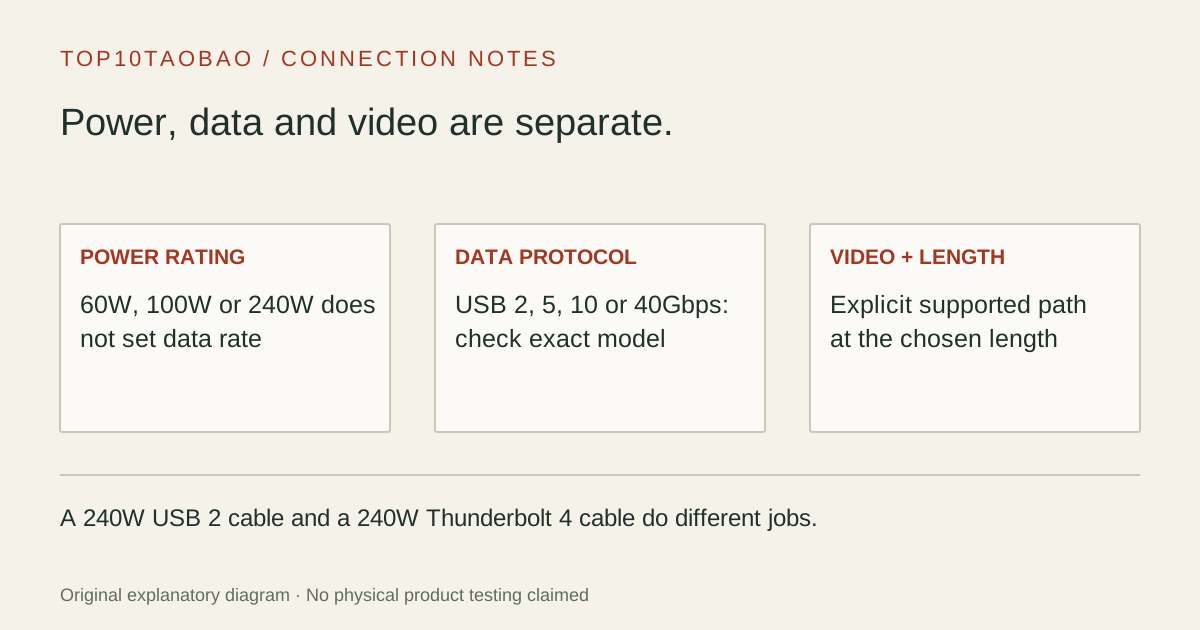
A 240W cable can still be a USB 2 data cable. A Thunderbolt-compatible plug is not a promise of a 40Gbps link. Choose the job first, then read power, data and video as three separate requirements.
By Top10Taobao Editorial · Sources checked November 5, 2026 · US edition
01 / CHECK THE COMPLETE SETUP
Start with the requirement.
Record both devices, the required length, charging wattage, data protocol and display task. Match the exact cable part number and length; a longer, active or differently rated version may have different capabilities.
Do not substitute a similar product name or a different regional package. The sources linked under each entry support the named model and its stated conditions.
Original explanatory diagram; not a product photograph or tested wiring configuration.
02 / THE COMPARISON
Read the limit beside the headline.
Scroll the table horizontally on a small screen. Limits are manufacturer claims, not measurements. Ask the maker about a condition that is decisive and still unknown.
Exact models and documented restrictions; prices and live stock omitted
A one-meter 5Gbps peripheral or documented DP Alt Mode display connection when 60W is enough.
Skip it when
Your laptop requires more than 60W, your storage needs 10Gbps, or the dock needs a Thunderbolt/USB4 link. USB315CC1M is not the similarly named 10Gbps cable.
A compatible 10Gbps USB-C enclosure or USB-C dock that also needs a documented video path or more than a 60W cable rating.
Skip it when
You need a Thunderbolt/USB4 40Gbps host link or charging above 100W. A USB-IF certification claim does not add a protocol absent from this exact model.
A two-meter 240W charge cable may suit the power route while the dock keeps its original, fully featured host cable. Do not swap those cables just because both ends fit.
Attach a 10Gbps SATA enclosure
Check the enclosure’s device-side socket first. A USB-C-to-C cable cannot directly replace the Micro-B lead on an enclosure with a Micro-B socket.
Replace a 40Gbps dock cable
Use the dock’s required protocol and replacement guidance, then confirm power and supported length. Test the displays and storage together after the replacement, not only whether the laptop charges.
05 / EVIDENCE & SCOPE
What the comparison establishes.
This is a four-model capability comparison, not a durability, charging-speed or best-to-worst test. We did not measure resistance, sustained throughput, connector life or temperature. Specifications do not establish that a charger and device will negotiate the cable’s maximum wattage.
Each entry has an original fit explanation, an exclusion and an alternative. We selected the models for distinct documented arrangements rather than copying another publication's order. Unknown fields are not filled by estimates, and manufacturer marketing measurements are not relabeled as independent tests.
Cable current/power rating plus compatible charger and device profile
A high data rate or thick jacket
Storage/data
Exact USB/TB protocol and data rate on both endpoints
240W printed on a cable
Display/dock
Explicit video/protocol support, display mode and host limits
USB-C connector shape or a charging result
More distance
Exact length and active/passive compatibility
The same brand on a shorter model
The useful question is whether a cable preserves the required link. A 40Gbps-rated cable connected to a 5Gbps device will not turn that device into 40Gbps storage. A 240W-rated cable attached to a lower-power charger does not create additional charging power.
Read certification as a scoped claim
USB-IF’s cable power-rating guidance separates cable power marking from performance information. Its logo-license page explains that the certified logo is tied to compliance. A logo should be checked against the exact product and cable length; it is not a guarantee of a complete laptop, dock and display combination.
In this comparison, the two Plugable certification fields are manufacturer-reported. We did not independently retest the cables or perform a current certification-database identity audit. The StarTech sheet establishes 5Gbps and 60W; its Thunderbolt compatibility wording is not relabeled as Thunderbolt 4 certification. An absent certification statement is left unconfirmed, not treated as proof that a product failed testing.
Keep length, data mode and charging power on the same line
Write a replacement request as a complete line: “one-meter USB-C to USB-C, 10Gbps, DP Alt Mode required, up to 100W.” That makes a charge cable, a lower-power data cable and an unsuitable device connector easier to reject. If the original was active, do not assume the same model family’s passive version covers the required distance or protocol.
For a dock, consult the manufacturer’s replacement-cable guidance and the exact dock manual. Keep the supplied host cable as a diagnostic reference. Successful charging proves the power path; it does not prove that video and high-speed data lanes are available.
Check the printed SKU, length and packaging against the maker’s product page.
Confirm the target connector at each end; USB-C, USB-A and SuperSpeed Micro-B are separate physical requirements.
Verify the expected display mode and negotiated data link, then copy a representative file set without interrupting the drive.
Keep any measured result separate from the manufacturer’s maximum. This page does not provide benchmark or cable-lifetime results.
Use the checklist for requirements and this page for exact models