3 USB Sharing Switches: Data Ports, Video and Power
A USB sharing switch changes which computer owns supported USB peripherals. It is useful for a keyboard, printer or storage desk, but a data switch is not automatically a video KVM, laptop charger or file-transfer bridge between the computers.
By Top10Taobao Editorial · Sources checked November 5, 2026 · US edition
01 / CHECK THE COMPLETE SETUP
Start with the requirement.
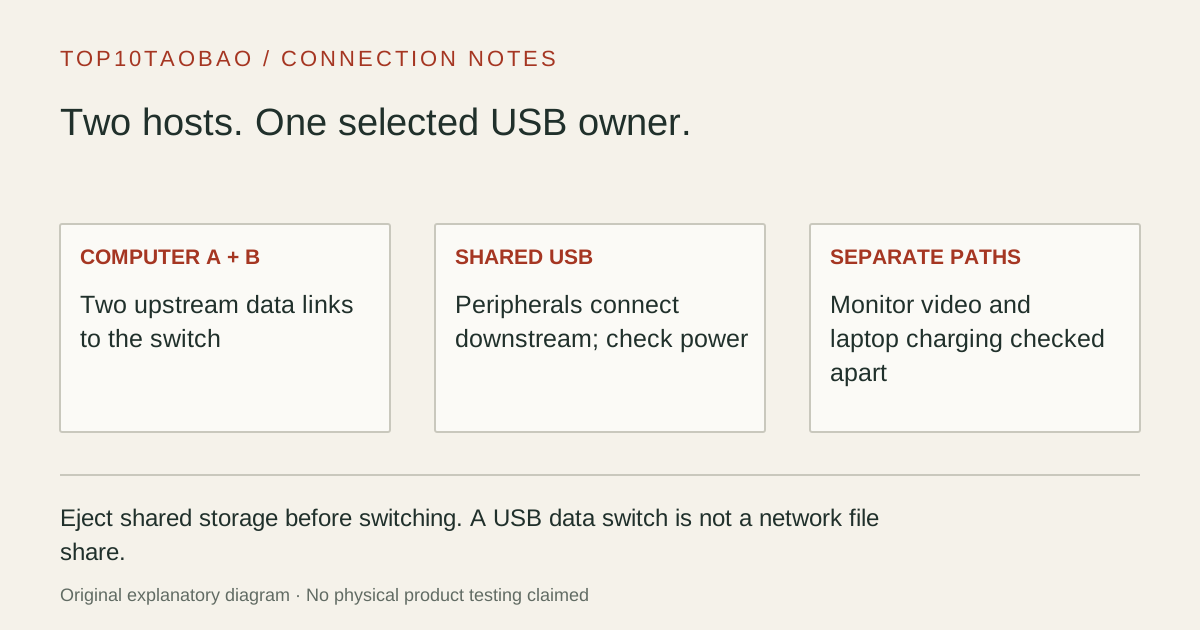
Draw two upstream links, one from each computer to the switch, then the shared downstream devices. Mark the monitor and laptop chargers separately. Check the host connector at each computer, required device power and whether any attached storage must be ejected before switching.
Do not substitute a similar product name or a different regional package. The sources linked under each entry support the named model and its stated conditions.
Original explanatory diagram; not a product photograph or tested wiring configuration.
02 / THE COMPARISON
Read the limit beside the headline.
Scroll the table horizontally on a small screen. Limits are manufacturer claims, not measurements. Ask the maker about a condition that is decisive and still unknown.
Exact models and documented restrictions; prices and live stock omitted
Count downstream sockets. A single-device switch needs a suitable hub to attach multiple peripherals; a four-port model can accept them directly if power and connector requirements fit.
A USB-C SSD shared between two hosts
Choose the correct data connector and supported link, then include a safe-eject step before switching. The SSD is not simultaneously mounted on both computers and the switch is not a network file share.
Two laptops, one USB-C monitor
Keep the monitor video and each laptop’s power separate or select a specifically documented video KVM. None of these data-only arrangements is a blanket substitute for a USB-C KVM dock.
05 / EVIDENCE & SCOPE
What the comparison establishes.
This is a three-model arrangement comparison, not a switch-speed or reliability ranking. We have not measured reconnection time, USB audio behavior, sustained storage speed, wake-up or device compatibility. Link rates are not aggregate throughput per peripheral. A peripheral may require its own driver on each host even when the switch itself is driver-free.
Each entry has an original fit explanation, an exclusion and an alternative. We selected the models for distinct documented arrangements rather than copying another publication's order. Unknown fields are not filled by estimates, and manufacturer marketing measurements are not relabeled as independent tests.
Count host links and peripheral sockets separately
Two-computer USB sharing plan
Item
Question to resolve
Purchase consequence
Computer A and computer B
Does each have the correct USB data connection and cable?
Two upstream leads are needed
Keyboard, mouse, printer, drive
How many downstream sockets and which connector types?
A one-device switch may need a separate compatible hub
Power-hungry peripherals
What power is available to the attached devices?
Check supported auxiliary power or a powered hub
Monitors and laptop chargers
Are video and host PD explicitly supported?
These functions need separate documented paths here
The switch-side connector and the computer-side connector may differ on the same cable. Read the supplied cable description before ordering replacements. Connect computers to the upstream host ports, not to downstream accessory sockets simply because a plug fits.
A USB dock through a switch is a model-specific exception
Plugable documents support for particular USB 3.0 dock arrangements but explicitly excludes USB-C Alt Mode and Thunderbolt docks from USB3-SWITCH2. Cable Matters 201160 explicitly excludes docks and video adapters. Do not transfer one maker’s supported arrangement to the other switch or to a different dock.
A USB-graphics dock is also not the same as a native USB-C video dock. If your maker explicitly supports a DisplayLink dock through a data switch, both computers still need its supported software and USB path. That exception does not create PD pass-through or native display lanes in an ordinary USB-A switch.
Finish file transfers, saves, print jobs or recordings on the active computer.
Safely eject shared storage using that operating system’s controls before changing host ownership.
Use the button or documented remote, then wait for the other computer to recognize the devices.
Confirm the correct active host before starting work; a switching LED does not prove that every peripheral has reconnected.
Do not treat the switch as a file-transfer cable directly linking the computers. A switched drive belongs to the selected host. If both computers need concurrent access, use an appropriate network sharing arrangement instead of repeatedly interrupting a mounted filesystem.
For an audio interface, security key, specialist control device or high-demand webcam, get model-specific compatibility guidance and check the actual work session. Driver-free switching does not establish that the peripheral tolerates every disconnect/reconnect cycle.
Choose the category by what must change together
Use this comparison when the requirement is USB peripheral ownership. Use the KVM category guide when you are still deciding what needs to switch, the HDMI guide when only the video signal needs selection or duplication, and the USB hub power guide when peripheral power remains uncertain.
Continue with the specific connection task
For a shared headset path, first establish the required microphone and headphone jack arrangement. Recheck the selected input and output after switching hosts; a data switch does not establish every audio app’s reconnection behavior.